Every year, millions of Indian pensioners face the same challenge physically visiting banks or pension offices to submit their Life Certificate. This annual process ensures that the pensioner is alive and eligible to receive a pension, but it often causes inconvenience, especially for elderly and differently-abled individuals. To address this, the Government of India introduced Jeevan Pramaan, a fully digital solution that allows pensioners to verify their existence electronically.
This blog explains everything you need to know from what it is, its benefits, eligibility, documents, and most importantly, how to generate Jeevan Pramaan online quickly and securely.
What Is Jeevan Pramaan?
Jeevan Pramaan is a secure, Aadhaar-verified Digital Life Certificate (DLC) system developed by the National Informatics Centre (NIC) under the Digital India initiative. It digitally confirms the pensioner’s life status through biometric authentication. Once generated, the certificate is automatically available to the respective pension disbursing agency whether a bank, post office, or government department.
This system removes paperwork and manual verification, offering convenience, speed, and transparency. Pensioners can generate their certificate either online through the Jeevan Pramaan app or offline at designated centers such as banks, post offices, or Common Service Centres (CSCs).
Why Jeevan Pramaan Matters for Pensioners
The importance of Jeevan Pramaan lies in its simplicity and accessibility. For decades, pensioners had to travel long distances or depend on others just to prove they were alive. The digital certificate replaces that outdated process with a few biometric steps.
Here’s why the system is a game-changer for retirees:
Convenience: Pensioners can easily understand how to generate Jeevan Pramaan online from home.
No Physical Visits: Eliminates the need to visit pension disbursing agencies.
Transparency: Reduces the chances of manual errors or fraud.
Instant Processing: Pension authorities can verify certificates in real-time.
Accessibility: Especially beneficial for senior citizens or disabled pensioners.
Eligibility Criteria
To use Jeevan Pramaan services, you must meet the following eligibility conditions:
You must be a pensioner of the Central Government, State Government, PSU, or any other government-supported organization.
You must have a valid Aadhaar number.
Aadhaar must be linked to your pension bank account.
Your mobile number should be linked to Aadhaar for OTP-based verification.
If you meet these conditions, you can easily proceed with how to generate Jeevan Pramaan online using either your mobile device or desktop.
Documents Required for Jeevan Pramaan
Keep the following documents ready before you start:
Aadhaar Card (linked to mobile number)
Pension Payment Order (PPO) Number
Pension Disbursing Bank Account Number
Registered Mobile Number
Email ID (optional)
Biometric device (fingerprint or iris scanner if generating online)
These documents ensure smooth registration during the process of how to generate Jeevan Pramaan online.
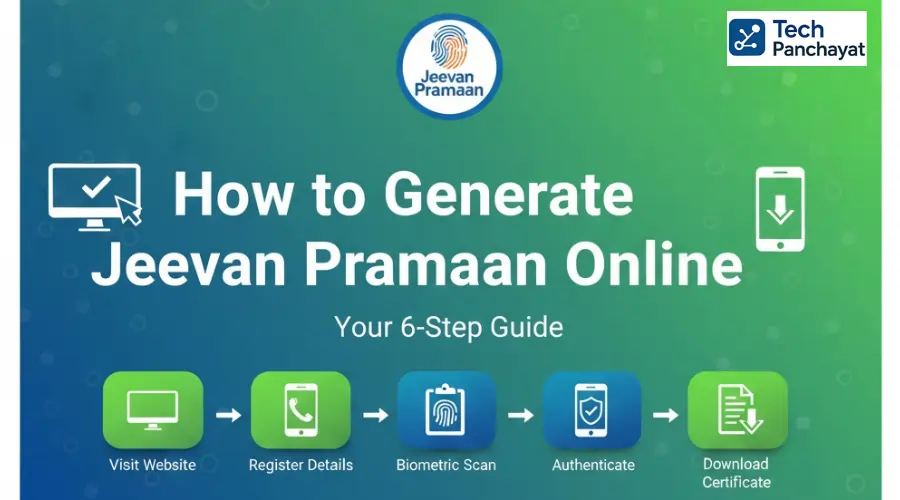
How to Generate Jeevan Pramaan Online: Step-by-Step Instructions
Here’s a complete process on how to generate Jeevan Pramaan online using the official website or mobile app.
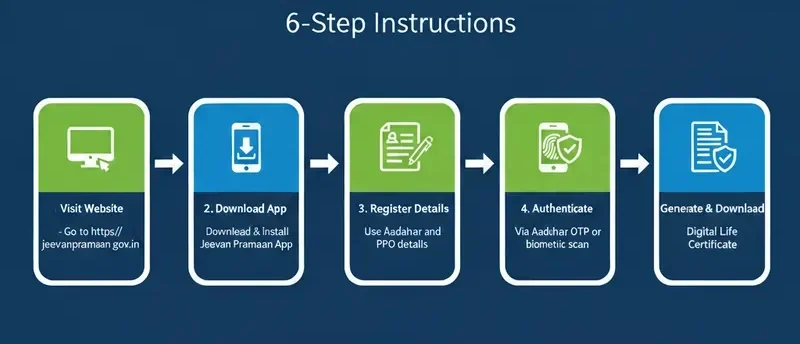
Step 1: Download the Jeevan Pramaan Software or App
Visit the official Jeevan Pramaan website and download the software for your device – Windows, Android, or CSC center.
- If you’re using a mobile, install the Jeevan Pramaan App directly from the Google Play Store .
- If you’re on Windows PC, download the setup file and install it.
Tip: Ensure your biometric device drivers are installed before launching the software.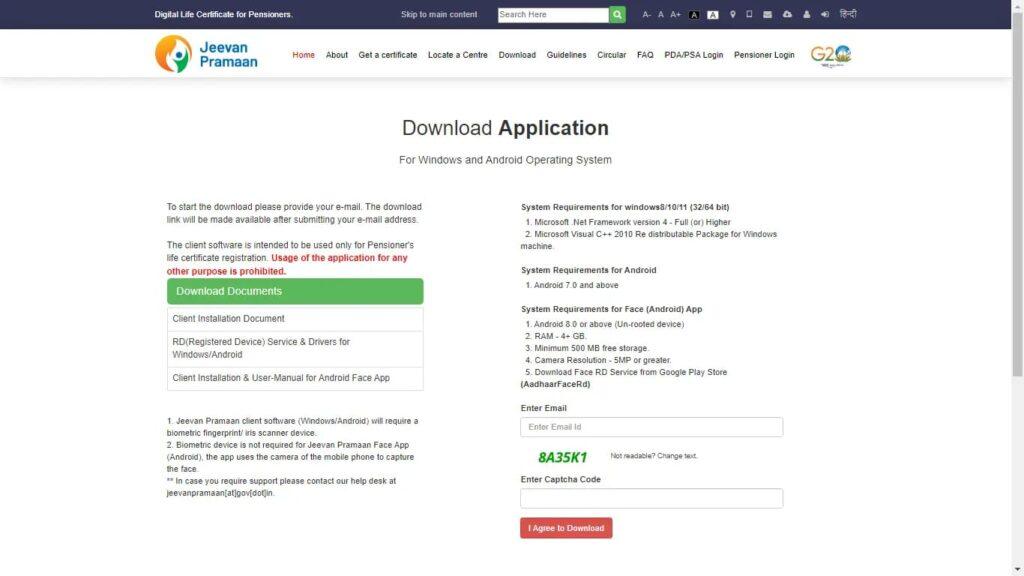
Step 2: Connect Biometric Device
- After installation, connect your fingerprint or iris scanner to your device. The Jeevan Pramaan system uses this biometric verification to confirm your identity through Aadhaar.
- Make sure the biometric drivers are working properly. You can test your device using the manufacturer’s utility tool before proceeding.
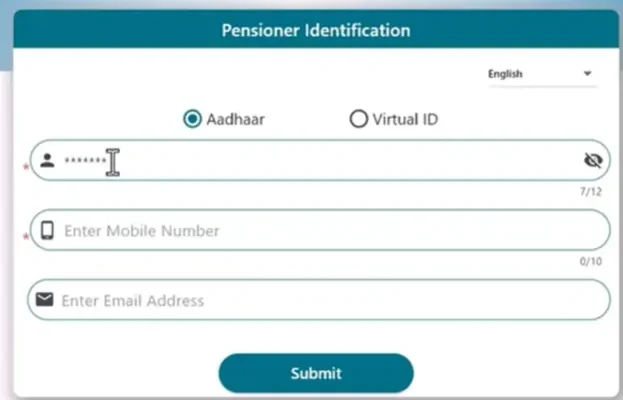
Step 3: Register Yourself on Jeevan Pramaan
Open the Jeevan Pramaan App or software and select “New User”. Fill in the required details such as:
Pensioner Name
Aadhaar Number
PPO Number
Pension Sanctioning Authority
Bank Account Details
Mobile Number
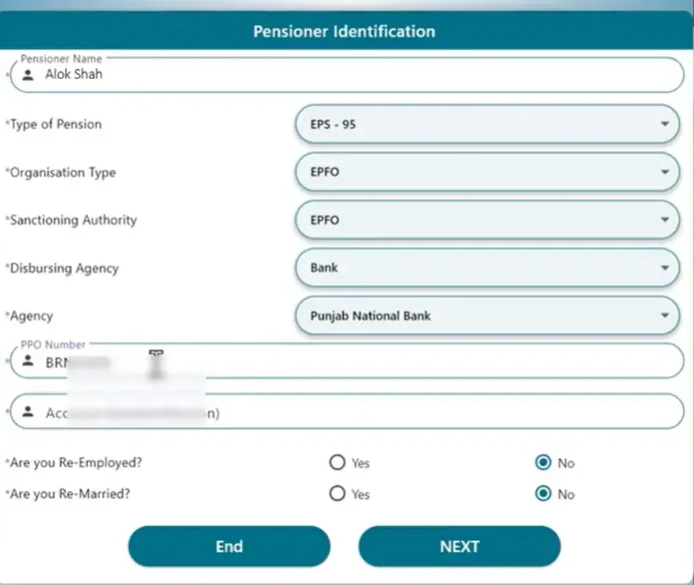
You will receive an OTP on your Aadhaar-linked mobile. Enter it to verify your identity.
Step 4: Provide Biometric Authentication
Once verified via OTP, you’ll be prompted to complete biometric authentication using your connected device.
Place your finger or eye (depending on device type) on the scanner. The system will verify it with Aadhaar records and confirm your identity instantly.
This is the most important step in the process of how to generate Jeevan Pramaan online, as it authenticates your digital life certificate.
Step 5: Generate Your Jeevan Pramaan (DLC)
After successful verification, your Digital Life Certificate (DLC) will be generated immediately.
You’ll receive:
Pramaan ID (Unique Reference Number)
SMS Confirmation on your registered mobile
You can download the certificate instantly or access it anytime using your Pramaan ID on the Jeevan Pramaan website.
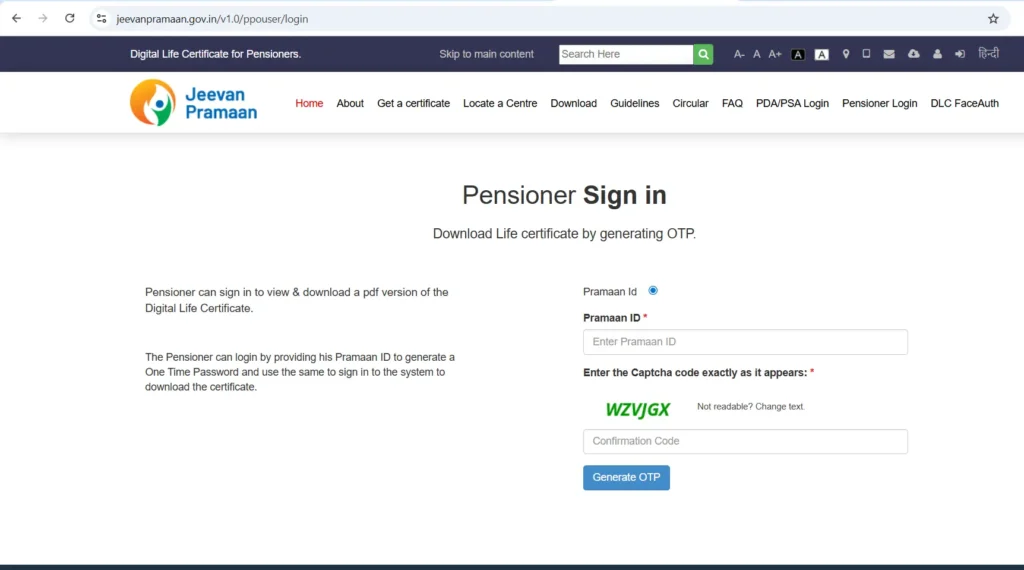
Step 6: Share Your Digital Life Certificate
Once your DLC is generated, it is automatically sent to your Pension Disbursing Agency (PDA), such as banks or post offices.
However, you can also manually download it and share it via email or print a copy for your records.
To download:
Enter your Pramaan ID
Verify with OTP
Download or print your Digital Life Certificate
That’s how you can easily generate Jeevan Pramaan online and keep receiving your pension without visiting any office.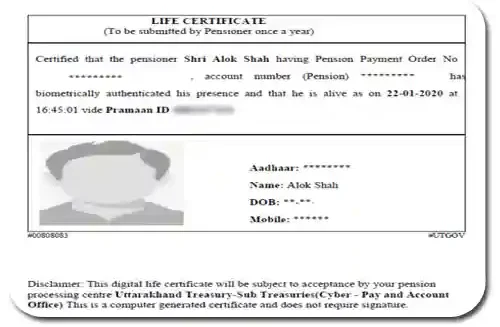
How to Generate Jeevan Pramaan Offline
If you prefer offline verification, the government has authorized several centers for assistance:
Option 1: Common Service Centres (CSCs)
Visit the nearest CSC.
Carry your Aadhaar, PPO number, and mobile phone.
The operator will assist with biometric authentication and generate your Jeevan Pramaan certificate.
Option 2: Banks and Post Offices
Many branches across India are equipped to help you generate your Digital Life Certificate.
Provide Aadhaar and pension details; they will complete biometric verification on your behalf.
Even if you know how to generate Jeevan Pramaan online, these centers are helpful alternatives for pensioners who are not tech-savvy.
How to Check Jeevan Pramaan Status
Once you’ve learned how to generate Jeevan Pramaan online, checking its submission status is equally important.
Follow these steps:
Visit https://jeevanpramaan.gov.in.
Click on “Certificate Status.”
Enter your Pramaan ID and Captcha code.
Your Digital Life Certificate details and verification status will be displayed instantly.
Common Problems and Their Solutions
Understanding these common fixes will help you handle minor issues during how to generate Jeevan Pramaan online.
| Issue | Possible Reason | Solution |
|---|---|---|
| OTP not received | Mobile number not linked with Aadhaar | Update your Aadhaar-linked mobile at the nearest UIDAI center |
| Biometric device not working | Driver or connectivity issue | Reinstall drivers or try another supported biometric device |
| Certificate not accepted | Delay in data synchronization | Wait for 24 hours or share Pramaan ID manually |
| Aadhaar mismatch | Incorrect personal details | Update Aadhaar or pension records accordingly |
Benefits of Jeevan Pramaan
The Digital Life Certificate offers numerous advantages for pensioners across India:
100% Paperless: No physical forms required.
Instant Generation: Takes only a few minutes once biometric verification is done.
Secure Verification: Uses Aadhaar-based biometric data for authenticity.
Centralized Database: Pension offices can access certificates in real time.
Supports All Pension Types: Works for central, state, and PSU pensioners.
Eco-Friendly: Reduces paper usage and administrative workload.
For anyone wondering how to generate Jeevan Pramaan online, these benefits make the digital process worth adopting.
Conclusion
The launch of Jeevan Pramaan is a major achievement in India’s digital governance. It brings relief and dignity to senior citizens who depend on timely pension disbursement. By understanding how to generate Jeevan Pramaan online, pensioners can complete their verification process without physical visits or paperwork.
This initiative showcases how technology can empower citizens and simplify government procedures. With tools like biometric authentication, real-time data sharing, and Aadhaar integration, the Digital Life Certificate ensures pensioners stay connected, secure, and independent.
FAQs
1. Is Jeevan Pramaan mandatory for pensioners?
No. It’s not mandatory, but highly recommended as it simplifies the process. Pensioners can still submit their Life Certificate manually if they prefer.
2. How often should I submit my Jeevan Pramaan?
Generally, once a year, usually in November.
3. Can I use Jeevan Pramaan without Aadhaar?
No. Aadhaar authentication is essential to generate the digital certificate.
4. Can family pensioners use this service?
Yes. Family pensioners with valid Aadhaar and PPO numbers can also generate the certificate.
5. What if I lose my Pramaan ID?
You can regenerate or download it anytime from the official Jeevan Pramaan website.